
Credits and plans
How credits work, what each plan and top-up costs, which credits get used first, and worked examples for common situations. Updated whenever prices change.
Last reviewed 2026-10-01
At a glance
| Question | Answer |
|---|---|
| What does a credit buy? | One minute of Live Copilot or AI Mock Interview, rounded up to the next whole minute. |
| Cheapest way to start | Free plan with 15 credits, then Starter at $19/month on a 3-month plan. |
| Do plan credits roll over? | No. They reset to your plan's allowance on each billing date. |
| Do top-up credits expire? | No. Bonus credits stay until you spend them. |
| Can I cancel myself? | Yes, in Settings → Billing. You keep your plan until the end of the period you paid for. |
What uses credits
| Feature | Cost |
|---|---|
| Live Copilot (desktop, web, mobile) | 1 credit per connected minute, rounded up. A 45-minute interview costs 45 credits. In the desktop app, a session that ends within 30 seconds is not billed. |
| AI Mock Interview | 1 credit per minute, rounded up. You pick 5 to 60 minutes up front, and it never bills more than that plus a 3-minute buffer. |
| Job Search | 5 credits per new search. Cached searches and searches with no matches are free. |
| Auto-Apply | A monthly allowance comes with your plan. After that, each application costs 2 credits. |
| Prep Hub, Concept Explainers, Company Insights, Learning Programs, Resume Builder | Free. Resume downloads use a separate monthly download allowance, not credits. |
Plans and prices
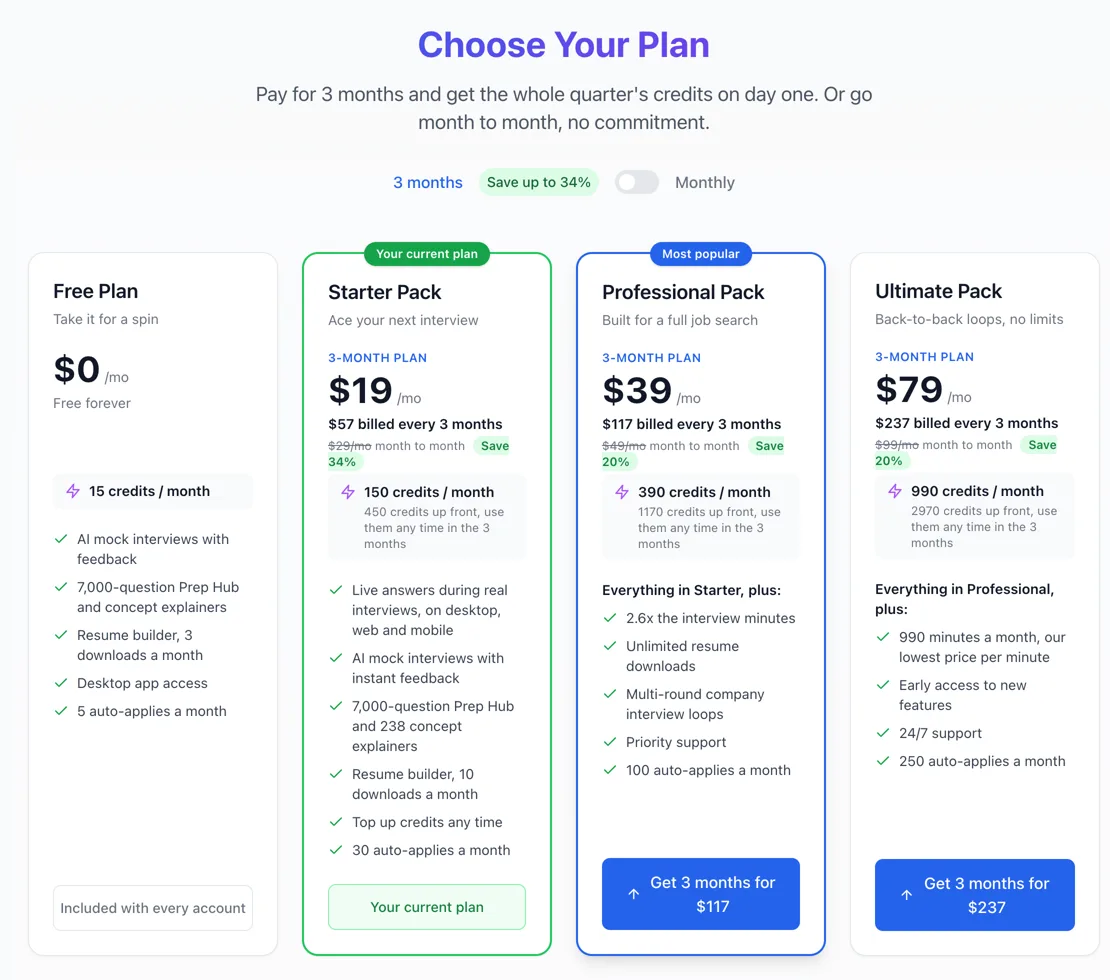
| Plan | Month to month | 3-month plan | Credits | Cost per credit |
|---|---|---|---|---|
| Free | $0 | – | 15 | – |
| Starter Pack | $29/mo | $19/mo$57 every 3 months | 150/mo390 up front on 3-month | 19.3¢14.6¢ on 3-month |
| Professional Pack | $49/mo | $39/mo$117 every 3 months | 360/mo1,215 up front on 3-month | 13.6¢9.6¢ on 3-month |
| Ultimate Pack | $99/mo | $79/mo$237 every 3 months | 750/mo2,520 up front on 3-month | 13.2¢9.4¢ on 3-month |
| Plan | Auto-Apply and downloads |
|---|---|
| Free | 5 auto-applies a month, 3 / month resume downloads |
| Starter | 30 auto-applies a month (up to 10 a day), 10 / month resume downloads |
| Professional | 100 auto-applies a month (up to 25 a day), unlimited resume downloads |
| Ultimate | 250 auto-applies a month (up to 50 a day), unlimited resume downloads |
Paying in rupees
How billing cycles work
Step 1: Monthly plans
On each renewal your plan credits are reset to the monthly allowance, for example 150 on Starter. Unused plan credits from the previous month do not carry over.Step 2: 3-month plans
You pay once every 3 months and get all three months of credits at once: 390 on Starter, 1,215 on Professional, 2,520 on Ultimate. Use them at any pace. At renewal the balance resets to a fresh 390 (or your plan's amount).Step 3: Bonus credits sit on top
Top-ups, referral rewards and promotional credits are bonus credits. Renewals and cancellations never remove them.
Top-up packs
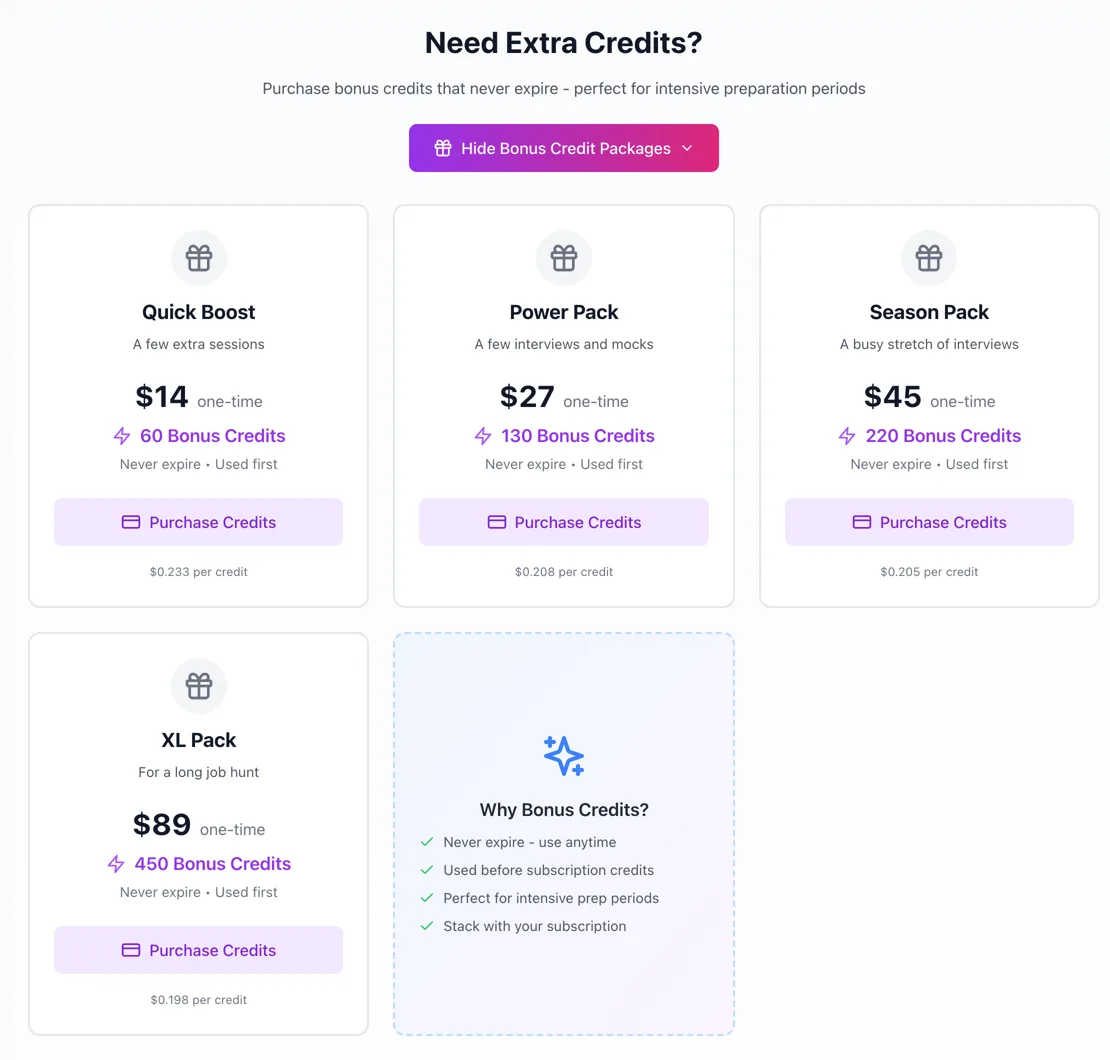
| Pack | Credits | Price | Cost per credit |
|---|---|---|---|
| Quick Boost | 70 | $14about ₹1,330 | 20¢ |
| Power Pack | 130 | $27about ₹2,565 | 20.8¢ |
| Season Pack | 220 | $45about ₹4,275 | 20.5¢ |
| XL Pack | 450 | $89about ₹8,455 | 19.8¢ |
Top-ups need an active paid plan
Top up or upgrade?
Which credits get used first
| Where | Order |
|---|---|
| Desktop app | Bonus credits first, then plan credits. |
| Web app (AI Mock Interview, web copilot) | Plan credits first, then bonus credits. |
Worked examples
A week of prep on Starter
- 3 mock interviews, 20 minutes each
- 60 credits
- 1 live interview, 45 minutes
- 45 credits
- 2 job searches
- 10 credits
- Left from 150
- 35 credits
Plenty of room. The leftover credits disappear at renewal, so use them for another mock before the billing date.
Out of credits with two interviews left
- 2 live interviews, 45 minutes each
- 90 credits
- Smallest pack that covers it
- Power Pack, $27
- Credits left afterwards
- 40, never expire
Buy the Power Pack now. The spare credits wait for your next interview. If this happens every month, move to Professional instead.
A heavy interview month
- 6 live interviews, 60 minutes each
- 360 credits
- 10 mock interviews, 30 minutes each
- 300 credits
- Total needed
- 660 credits
- Professional + XL Pack
- $138
- Ultimate, 750 credits
- $99
Ultimate covers the month for less and leaves 90 credits spare.
Starter on the 3-month plan
- Paid on day one
- $57
- Credits on day one
- 390
- Used in months 1, 2 and 3
- 220 + 150 + 80
- Left at renewal
- -60
Front-load practice before a big interview week without running out. At renewal the balance resets to 390; it does not add to what is left.
Auto-Apply past the allowance
- Applications this month on Starter
- 40
- Included in the plan
- 30
- Extra, at 2 credits each
- 20 credits
Applications you open but never submit are not charged.
A mock interview that runs long
- Length chosen
- 30 minutes
- Actually talked
- 36 minutes
- Billed
- 33 credits
Mocks never bill past your chosen length plus 3 minutes, so pick the length you really want.
Step 1: Upgrade or switch plans
Open Account → Subscription, pick the 3-month or monthly toggle, and choose a plan. Your credits are set to the new plan's allowance once the payment goes through, and the old plan stops renewing.Step 2: Cancel
Go to Settings → Billing and use Cancel Subscription. You keep your plan until the end of the period you paid for, then move to the Free plan with 15 credits. Unused plan credits end with the period. Bonus credits stay.Step 3: Refunds
A purchase can be refunded within 7 days if none of its credits were used. Bonus, free and promotional credits are not refundable. Email us from your account address with the payment date, amount and transaction ID.Step 4: Earn credits instead
Account → Referral Program gives you a link that earns bonus credits when friends sign up. Settings → Billing → Earn credits rewards sharing your experience.
Payment problems
| Question | Answer |
|---|---|
| What does the smallest top-up get me? | 70 credits for $14: about one 45-minute interview plus a short mock. |
| Can I buy a top-up on the Free plan? | No. Top-ups appear once you are on a paid plan. |
| Is there a yearly plan? | No. Plans are month to month or every 3 months. |
| Do I lose credits if I upgrade? | Your plan credits are set to the new plan's allowance. Bonus credits are untouched. |
| Why did my balance not move during an interview? | Sessions are billed once, when they end. The whole session shows up in your balance at that point. |
Still stuck?
Signed in? Open a ticket under Account → Support in the app. Otherwise use the contact form or email. Tell us what you tried, which page of this guide you were on, and your operating system or browser.