
Jobs
Resume Builder
Start from scratch, import a PDF, DOCX or TXT, or let AI draft a starter from a pasted job description. Then score it, tailor it to a role, generate a cover letter, share a private link and export to PDF, Word or plain text.
Step 1: Open Resume → Build Resume
Create Your Resume offers three fast paths: Start from Scratch, Import Resume (PDF, DOCX or TXT; LinkedIn's Save profile as PDF export works well) and Build from Job Description (paste a JD and AI drafts an objective, skills and suggested sections with placeholders; it never invents employers, dates or metrics). Below them, pick a template; each has its own layout and accent colour.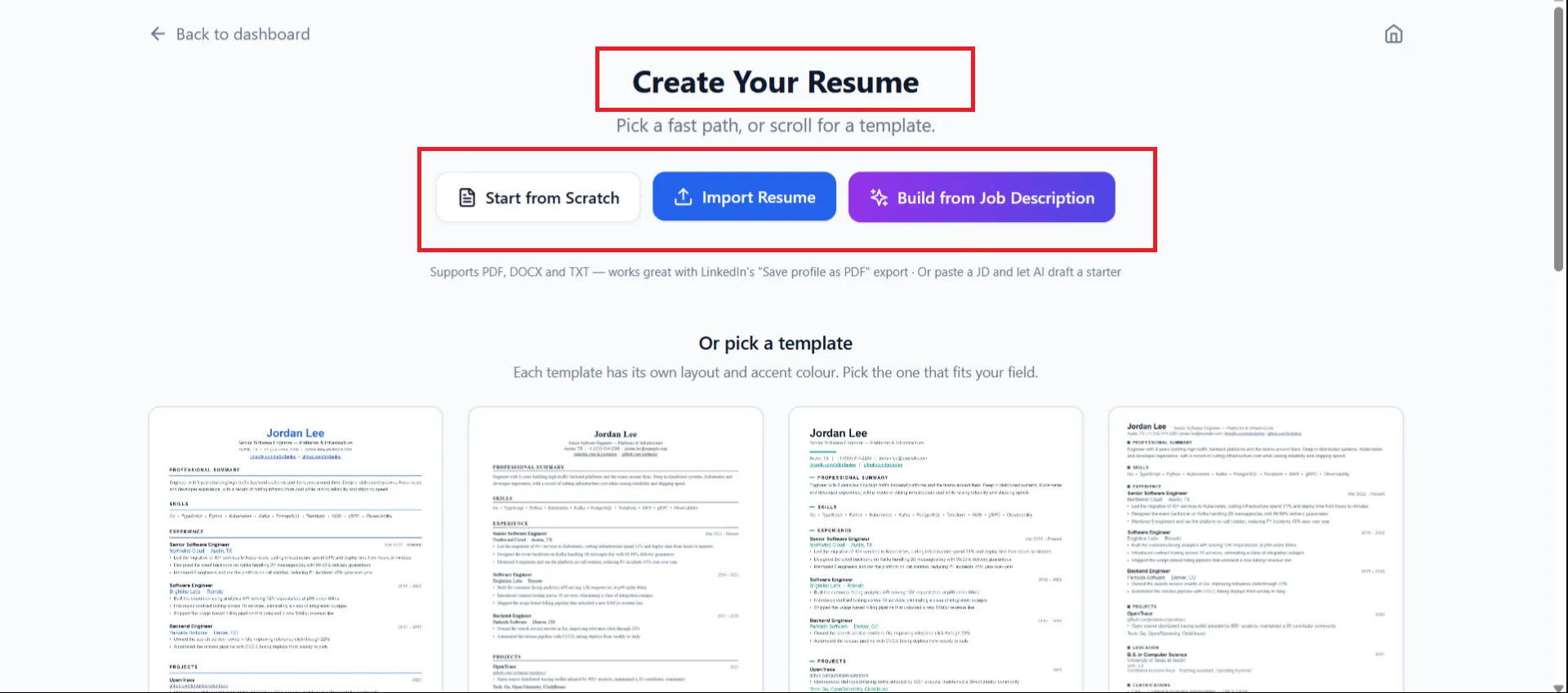
Resume → Build Resume. Step 2: Edit, then use the toolbar
The editor shows your resume on the right as you type. The toolbar along the top gives you:- Design: colours, fonts and spacing. Undo and redo (⌘/Ctrl + Z, Shift + ⌘/Ctrl + Z).
- Resume Score: sub-scores including ATS readiness. Paste the job description you are targeting for a relevance check. It will not suggest keywords that are not true for you.
- Tailor to job: paste a target job description and compare Current against Tailored side by side before accepting changes.
- Cover letter: generate one for a role and company from the same resume.
- Share: a private link to a read-only copy; you can see whether it was viewed.
- Versions: version history; Save (⌘/Ctrl + S) and an autosave indicator.
- Download PDF, with Word (.docx) and Plain text (.txt) in the menu for copy-paste application forms.
Step 3: Find it again later
Saved resumes are listed under Resume → Resume History with a preview. The resume you select there is also the one Job Search, Auto-Apply and the Live Copilot read from.
| Item | Details |
|---|---|
| Credits | Building and editing a resume does not consume interview credits. |
| Downloads | Each plan includes a number of resume downloads; the app shows your remaining downloads and prompts to upgrade when you reach the cap. |
| Import formats | PDF, DOCX, TXT. |
| Export formats | PDF, Word (.docx), plain text (.txt). |
One resume, everywhere
Upload your best resume once here. The Live Copilot, Mock Interview, Job Search match scores and Auto-Apply all read from it, so keeping it current improves every other feature.
Still stuck?
Signed in? Open a ticket under Account → Support in the app. Otherwise use the contact form or email. Tell us what you tried, which page of this guide you were on, and your operating system or browser.